Best USDT Wallet: Pick One That Matches Your Network

A USDT wallet is the app or device that holds the keys to your USDT and shows a receive address for it. The network you select in the wallet must be the same network the USDT is sent on: TRC-20, ERC-20, and BEP-20 are separate transfers, even though all three say USDT. Each network gives the wallet its own receive address, so the address you share decides where the USDT can land.
Pick a crypto wallet for USDT by the network it will arrive on, because no single USDT crypto wallet wins on every network. StealthEX offers a non-custodial, wallet-to-wallet swap into a wallet you control, with no account for a standard crypto-to-crypto swap. Get the network wrong, and a good wallet still shows a zero balance.
Article contents
- 1 What Is a USDT Wallet
- 2 USDT Wallets, One Network at a Time
- 3 Best USDT Wallet for the Network You Receive
- 4 The Wallet Network Must Match the Transfer
- 5 How to Create a USDT Wallet
- 6 How to Transfer USDT to Another Wallet
- 7 Frequently Asked Questions
- 7.1 Do You Need a Separate USDT Wallet for Each Network?
- 7.2 Is a TRC-20 Address the Same as an ERC-20 Address?
- 7.3 Does a Cold Wallet Store the USDT Coins Offline?
- 7.4 Do You Need TRX, ETH, or BNB in the Wallet Before Sending USDT?
- 7.5 Can USDT Sent on the Wrong Network Be Recovered?
- 7.6 Is a Free USDT Wallet Enough to Receive a Transfer?
- 8 Conclusion
What Is a USDT Wallet
USDT is the stablecoin issued by Tether to track the US dollar one-to-one. A Tether USDT wallet stores the private keys that move it on a blockchain, not dollars or coins inside the app. The same keys work in any wallet app that supports the network, and no company holds them for you.
The Wallet Holds the Keys
Your USDT always stays on its blockchain, for example TRON or Ethereum. The wallet reads that blockchain to show your balance, and only for networks it supports. If USDT arrives on a network the wallet does not list, the app will not show it, even when the transfer succeeded.
If you lose the phone, the seed phrase restores the same keys in another app, and the USDT is still on its network. A cold wallet keeps the keys offline on a device, but the coins stay on the blockchain there too. The safest USDT wallet is first of all one that supports your network.
USDT Wallets, One Network at a Time
Tether’s transparency page showed $175.4 billion of USDT issued on November 16, 2026, and 97.9% of it sat on TRON and Ethereum. TRON held $91.9 billion and Ethereum $79.9 billion, so most deposits you receive will use one of those two.
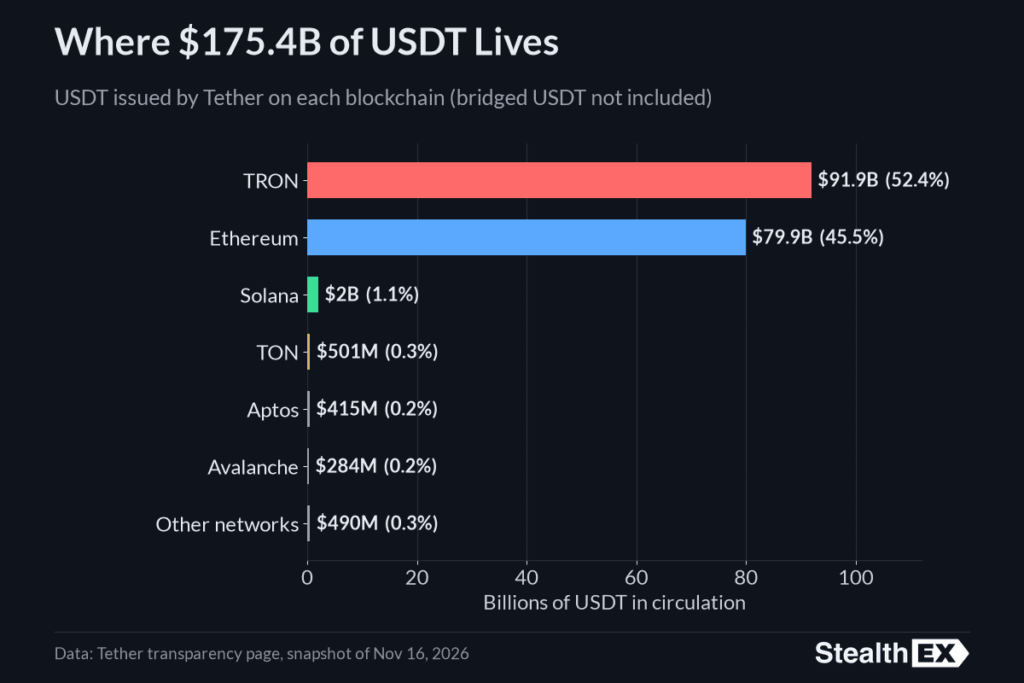
USDT supply by network. Source: Tether
Choose the Network Before the App
The exchange, person or service sending you USDT will name a network, such as TRON (TRC-20), Ethereum (ERC-20) or BNB Chain (BEP-20). Open a wallet that lists that exact network and use its receive screen for it. If the wallet does not list the network, it is the wrong wallet for that transfer, whatever its reviews say.
Exchanges show the network on the withdrawal screen next to USDT, often with a different label for the same rail: TRC20, TRON or TRX, ERC20 or Ethereum, BEP20, BSC or BNB Smart Chain. A person paying you should name the network along with the amount. If the sender only says USDT, ask which network before you share any address.
TRC-20 on TRON
A USDT TRC-20 wallet must list TRON or TRC-20, and the address you share must come from the TRON receive screen. TRON addresses start with the letter T.
Sending USDT out later needs energy and bandwidth, or TRX to pay instead: on November 17, 2026, a transfer from a wallet with no energy burned 6.77 TRX, and about twice that to an address that had never held USDT. Each activated TRON account gets 600 free bandwidth a day, but energy has no free allowance.
TronLink is a TRC-20 USDT wallet app built for TRON, and Trust Wallet listed USDT on TRON in its official asset list on November 17, 2026. A multi-chain app shows a separate 0x address for Ethereum, so make sure the address you copy starts with T.
ERC-20 on Ethereum
Your USDT ERC-20 wallet address comes from the Ethereum receive screen, starts with 0x and has 42 characters. ERC-20 is a different transfer from TRC-20, even when both sit in the same app. Sending USDT out later costs gas in ETH, which moves with traffic, so keep some ETH in the same wallet: a wallet with USDT but no ETH cannot send the USDT. An Ethereum address does not receive TRC-20 USDT as a normal payment.
The same 0x address also appears under BNB Chain, Polygon and Base in most multi-chain apps, so check that the receive screen says Ethereum or ERC-20. On an exchange, pick ERC-20 on the withdrawal screen only when your address came from that screen.
BEP-20, Polygon, and Other Networks
BEP-20 is USDT on BNB Chain, not Ethereum, and a USDT BEP-20 wallet pays the fee to send it in BNB. A USDT Polygon wallet pays fees in POL, and Polygon USDT uses its own token contract, named USDT0. Ethereum, BNB Chain, Polygon and Base share one address format, so the same 0x address can exist on all four, but a BEP-20 deposit shows up only under BNB Chain. A wallet that does not list Polygon cannot show Polygon USDT, even though its Ethereum address looks the same.
Solana and TON use their own address formats. Trust Wallet’s official asset list included USDT on Solana, TON and Polygon on November 19, 2026.
| Network | USDT standard | The receive screen must show | What the wallet needs later, to send | Check before you share the address |
|---|---|---|---|---|
| TRON | TRC-20 | TRON or TRC-20 | Energy and bandwidth, or TRX | The wallet lists TRON, and the address starts with T |
| Ethereum | ERC-20 | Ethereum or ERC-20 | ETH for gas | The address came from the Ethereum screen, not TRON |
| BNB Chain | BEP-20 | BNB Chain or BEP-20 | BNB | The sender picked BNB Chain, not Ethereum |
| Polygon | Polygon USDT (USDT0 on chain) | Polygon | POL | The wallet lists Polygon by name |
| Solana | Solana USDT | Solana | SOL | The wallet lists Solana |
| Any other network | The standard the sender names | That same network name | That network’s fee token | If the wallet does not list it, do not use that wallet for the deposit |
Best USDT Wallet for the Network You Receive
The best USDT wallet supports the incoming network, lets you hold the keys, and shows a receive address for that network. There is no universal winner. A wallet that is perfect for TRC-20 can be useless for a TON deposit. On November 19, 2026, Trust Wallet listed USDT on seven networks, while the TronLink app covered TRON only.
When You Use More Than One Network
A multi-chain app is the best USDT wallet app for several networks only if it gives each network its own receive screen. Trust Wallet lists USDT on TRON, Ethereum, BNB Chain, Polygon, Solana, TON and Base, and runs on iOS, Android and as a browser extension. TronLink covers TRON in its app, and its official site says the extension adds Ethereum and BNB Chain.
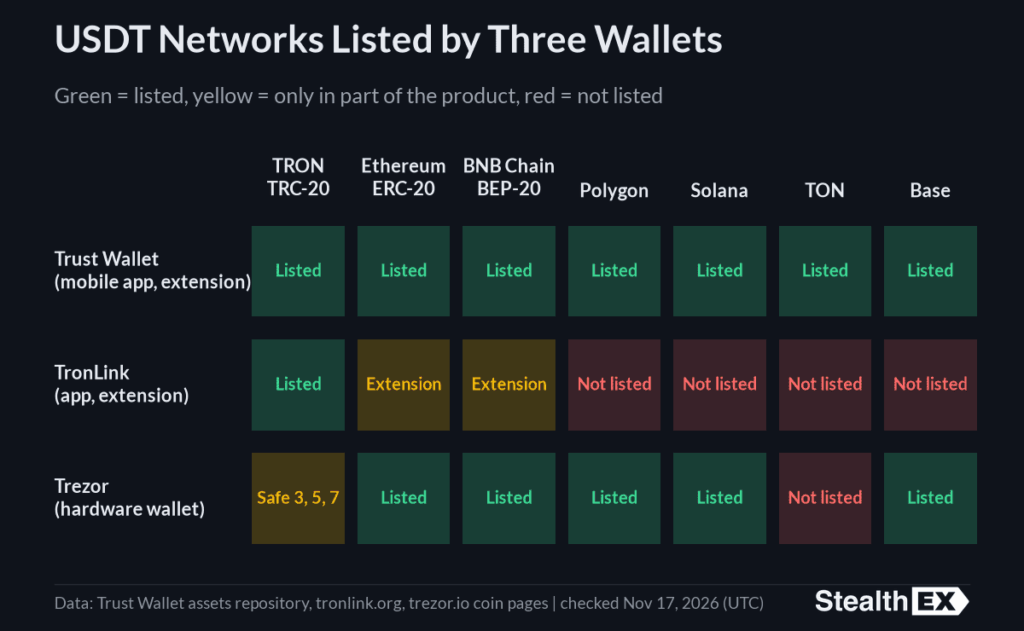
USDT networks by wallet. Source: Trust Wallet, TronLink, Trezor
Add the network inside the app and check its name above the address before you share it. A free USDT wallet can receive USDT, but sending later still costs the network fee. A self-custody wallet needs no account. One seed phrase covers every network in a multi-chain wallet, so losing it loses access to all of them at once.
When the USDT Arrives on TRON
For a TRON deposit, copy the address that starts with T from the TRON receive screen. TronLink and Trust Wallet both list TRON, so either can show this address, and your USDT TRC-20 wallet address stays the same for every later TRON deposit. A wallet that opens only an Ethereum address cannot take this transfer, even if it shows a USDT balance on another network. If the sender’s screen says TRC20 or TRON, this is the address to share. If it says ERC20, it is not.
When the USDT Will Sit Still
A USDT cold wallet, or cold storage, keeps the keys offline on a hardware wallet, and the device still has to support the network of your deposit. A cold wallet with no TRC-20 account does not fix a TRC-20 transfer. The device signs each send itself, so malware on a phone cannot move the USDT without it.
The official Trezor USDT page lists 11 networks, including TRON, Ethereum, BNB Smart Chain, Polygon, Base and Solana, but not TON. Its TRON page lists support only on the Trezor Safe 3, Safe 5 and Safe 7. Keep its recovery phrase offline and follow the steps on how to secure your crypto wallet.
The Wallet Network Must Match the Transfer
Warning: the network in the receiving wallet must be the same network the sender uses. USDT on both screens is not a match. TRC-20 to TRC-20 is a match. TRC-20 to ERC-20 is not.
Exchanges often offer several networks for the same USDT withdrawal, and the default is not always the one your wallet uses. Check it every time, even with a wallet you have used before.
Check Both Sides Before You Copy the Address
- Open the receive screen in your wallet for the network you expect
- Read the network name printed on that screen
- Read the network name on the exchange or the sender’s screen
- Copy the address only from the matching receive screen
- If the two names differ, stop and change the network on one side
TRC20 on one side and TRON on the other is a match, while TRC20 and BEP20 are not. Exchanges often save the last network you used, so a withdrawal that worked last month can default to the wrong rail today. Never test a mismatched network with the full amount. A small test makes sense only on a network you have already matched on both sides.
| Check | What to confirm | Do not assume |
|---|---|---|
| Sender | The network name on the outgoing USDT transfer | That a USDT balance tells you the network |
| Receiver | The wallet lists that same network and you are on its receive screen | That every USDT wallet accepts every network |
| Address | The address was copied from that network’s receive screen | That a TRON address and an Ethereum address are interchangeable |
| Later send | The wallet holds the fee token it needs to send USDT out | That a free app means the network fee is free |
| Swap | The swap widget offers the network you are about to use | That every network is available on every pair |
What a Mismatch Means
USDT sent to the wrong network is not a normal payment. The coins may not appear, or they may sit at an address your wallet does not show. Nobody can promise a recovery, so be careful with anyone who asks for a fee to do it.
If you sent USDT to the wrong network, do not send a second payment to fix the first one. Keep the transaction hash and contact the wallet or platform that controls the receiving address, if one does. If BEP-20 USDT went to your own 0x address instead of ERC-20, the coins sit at that same address on BNB Chain, and a self-custody wallet that supports BNB Chain may show them once you add it.
An exchange deposit address is different, because the exchange holds those keys. StealthEX cannot reverse a wrong-network transfer after a completed swap, because it does not hold the coins.
| What was sent | What the wallet can receive | What it means for you |
|---|---|---|
| TRC-20 USDT | An ERC-20, BEP-20, Polygon or other non-TRON address | This is not a normal transfer, and recovery is not guaranteed |
| ERC-20 USDT | A TRC-20 or other non-Ethereum address | This is not a normal transfer, so do not send a second payment |
| USDT on any network | A wallet that shows USDT but not that network | The ticker is not a match, so stop and compare the network names |
How to Create a USDT Wallet
To create a USDT wallet, you create keys, not opening an exchange account or a StealthEX account. Nobody has to approve you, no identity check is needed, and the wallet maker should never hold a copy of your keys.
Set Up the Wallet, Then Open the Right Network
Install the wallet only from its official website or the app store page that site links to, and check that the publisher name matches, since fake wallet apps are a common way to lose funds. Create a new wallet, write the seed phrase on paper, offline, and never type it into a website or a chat. Most wallets show 12 or 24 words, and none of them belongs in a screenshot or a cloud note. Then open the wallet’s network list, turn on TRON for TRC-20 or Ethereum for ERC-20, and only then open its receive screen.
Get the Address for That Network Only
A USDT wallet address is the receive address for one network. A TRON address starts with T and has 34 characters. An Ethereum, BNB Chain, Polygon or Base address starts with 0x and has 42 characters. A Solana address has 32 to 44 letters and numbers with no fixed prefix, and a TON address usually has 48 characters and often starts with UQ or EQ.
These are shapes, not addresses to send coins to. Copy your own address from your own receive screen, and check the first and last few characters after you paste it, because some malware swaps copied addresses. A QR code on the receive screen holds the same characters, so check the network before a sender scans it.
How to Transfer USDT to Another Wallet
Fill a new wallet from a wallet you already control, or with a swap that pays out to the new address. In both cases, match the network on both sides first, and save the transaction hash so you can track the transfer on an explorer. Without the hash, neither a wallet nor an exchange can trace a missing transfer.
A Swap Into the New Wallet
StealthEX is a non-custodial exchange, and a standard crypto-to-crypto swap needs no account. You can choose a fixed rate or a floating rate. The on-screen estimate includes the network fee and the liquidity provider fee, and you still pay the network fee of the coin you send from your own wallet.
The service does not keep your USDT after the swap and does not set any blockchain fee. Verification may be requested in some cases, for example, if a wallet or transaction is flagged. The widget offers USDT on several networks, including TRON (TRC-20), Ethereum (ERC-20), and BNB Chain (BEP-20). Check the network label next to USDT in the widget before you send. In a quote on November 19, 2026, 100 USDT TRC-20 returned about 98.19 USDT ERC-20, fees included.
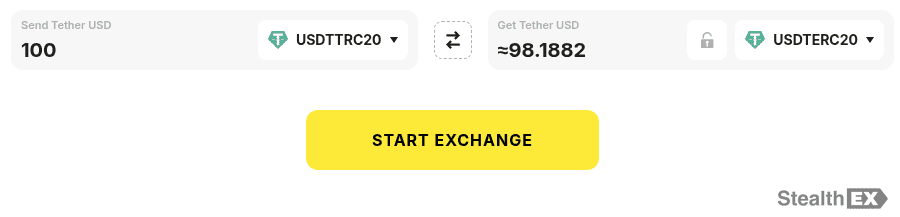
StealthEX USDT quote. Source: StealthEX
Start on the Tether swap page, and see how it works for each step.
Start a USDT swap with no registration
Frequently Asked Questions
Do You Need a Separate USDT Wallet for Each Network?
No, if one wallet lists each network and shows a separate receive address for it. Yes, you need the matching address for each network: one address does not receive USDT on every network, even inside the same app.
Is a TRC-20 Address the Same as an ERC-20 Address?
No. They are addresses on different networks: a TRC-20 address starts with T and has 34 characters, and an ERC-20 address starts with 0x and has 42. Sending TRC-20 USDT to an ERC-20 address is not a normal transfer.
Does a Cold Wallet Store the USDT Coins Offline?
No. It stores the keys offline. The USDT remains on the network the wallet supports, and the device only signs transfers with those keys. If the device breaks, the seed phrase restores the keys on a new one.
Do You Need TRX, ETH, or BNB in the Wallet Before Sending USDT?
You may need it when you send USDT out. TRC-20 can require TRX if bandwidth or energy is not available, ERC-20 gas is paid in ETH, and BEP-20 uses BNB. Receiving USDT is a separate step that needs none of these coins.
Can USDT Sent on the Wrong Network Be Recovered?
There is no guarantee. Stop, keep the transaction hash, and contact the wallet or platform that controls the receiving address, if one does. A public network does not reverse the transfer, and StealthEX cannot reverse a completed swap. Do not pay anyone who promises to get the coins back.
Is a Free USDT Wallet Enough to Receive a Transfer?
Yes, when it supports the sender’s network, and you hold the keys. Being free does not remove the network fee on a later send: TRON may still need TRX, and Ethereum needs ETH.
Conclusion
Pick the wallet by the network the USDT will arrive on, and do not share an address until the network names on both sides match. The best wallet for USDT in 2026 is the one that lists your network and lets you hold the keys. A wallet with great reviews is still the wrong one if it does not list your network. Read the network name on both screens before every deposit.
When you are ready to fill the wallet, start a swap on StealthEX with no registration, straight into a wallet you control. See how it works, open the USDT swap page, and keep the wallet safe with these wallet security habits.
Don’t forget to do your own research before buying any crypto. The views and opinions expressed in this article are solely those of the author.
crypto wallet cryptocurrency wallet Tether USDT walletRecent Articles on Cryptocurrency